

For Filipino users who are already familiar with digital wallets, PlayTime APP GCash offers a straightforward way to view GCash as a payment option inside the PlayTime wallet. The interface presents GCash alongside other payment choices, with separate sections for deposits and withdrawals.
What Is PlayTime APP GCash?
PlayTime APP GCash refers to using the GCash option displayed within the PlayTime wallet for depositing and withdrawing funds.
The wallet interface provides a dedicated GCash payment tab. Other visible payment choices include Maya, while the deposit interface also displays QRPH and Bank Transfer. The wallet has separate Deposit and Withdrawal sections, making it possible to select the transaction type before choosing an amount.
For Filipino users who already use GCash for digital payments, this wallet-style layout may feel familiar. The available options appear in Philippine peso denominations, making it easier to identify the amount you want to select.
However, seeing GCash in the interface does not mean that every GCash feature or service supports it.Always follow the instructions shown in the latest PlayTime APP.
How to Deposit in PlayTime Using GCash
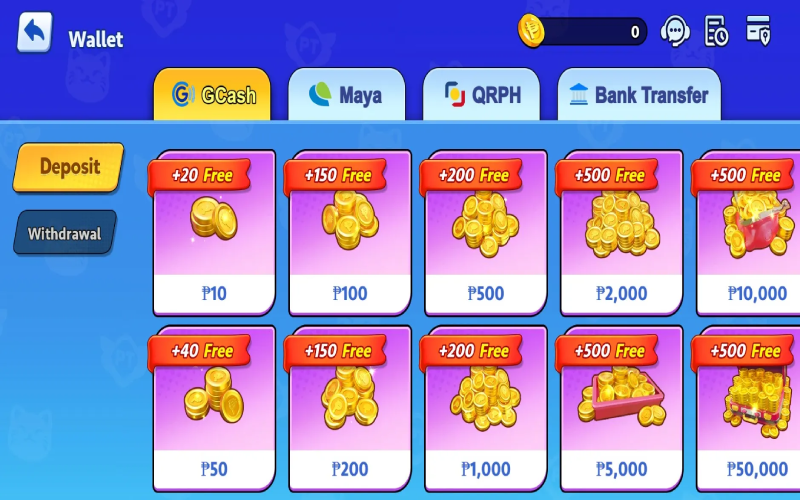
If you want to understand how to deposit in PlayTime using GCash, the wallet interface provides a simple starting point. Follow the displayed options carefully:
- Open the PlayTime wallet.
- Select GCash from the available payment methods.
- Make sure Deposit is selected.
- Choose one of the displayed deposit amounts.
- Continue with the payment instructions presented by PlayTime.
- Review the transaction details carefully before confirming.
The visible PlayTime GCash deposit denominations are:
- ₱10
- ₱50
- ₱100
- ₱200
- ₱500
- ₱1,000
- ₱2,000
- ₱5,000
- ₱10,000
- ₱50,000
The deposit interface also displays promotional labels on these amount cards. The visible promotional amounts are:
- ₱10 — +20 Free
- ₱50 — +40 Free
- ₱100 — +150 Free
- ₱200 — +150 Free
- ₱500 — +200 Free
- ₱1,000 — +200 Free
- ₱2,000 — +500 Free
- ₱5,000 — +500 Free
- ₱10,000 — +500 Free
- ₱50,000 — +500 Free
Treat these amounts only as promotional figures displayed in the supplied PlayTime wallet interface. Do not automatically interpret them as pesos, guaranteed income, or immediately withdrawable cash. Before making a PlayTime GCash deposit, check the current promotion terms and eligibility conditions inside the app.
How to Withdraw from PlayTime to GCash
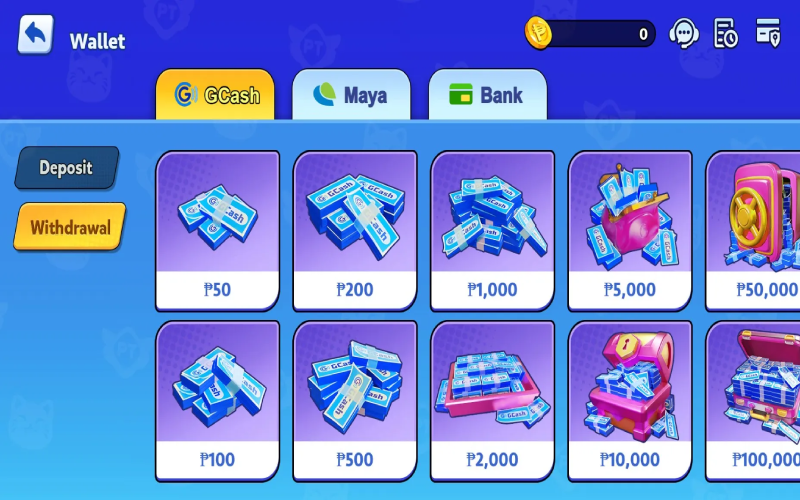
The PlayTime GCash withdrawal interface is separate from the deposit section. To understand how to withdraw from PlayTime to GCash, use the following basic flow:
- Open the PlayTime wallet.
- Select the GCash payment tab.
- Choose Withdrawal.
- Select an available withdrawal denomination.
- Follow the withdrawal instructions displayed inside the app.
- Review the destination GCash information and amount before submitting.
The supplied withdrawal interface displays these amount options:
- ₱50
- ₱100
- ₱200
- ₱500
- ₱1,000
- ₱2,000
- ₱5,000
- ₱10,000
- ₱50,000
- ₱100,000
These are the withdrawal amount options visible in the supplied PlayTime wallet interface. They should not be interpreted as universal minimum or maximum withdrawal limits.
The available requirements may depend on the current PlayTime APP interface and applicable rules. The supplied information does not establish processing times, GCash fees, PlayTime fees, verification requirements, turnover requirements, or daily limits. Check the latest withdrawal page for the current instructions before submitting a PlayTime GCash cash out request.
Deposit vs Withdrawal on the PlayTime GCash Wallet
The main difference between the two sections is their purpose.
Deposit is used to add funds through a selected payment method. The GCash deposit interface displays preset peso amounts ranging from ₱10 to ₱50,000.
Withdrawal is used to request funds from an available PlayTime balance through GCash. Its displayed denominations range from ₱50 to ₱100,000.
The two interfaces therefore show different preset amounts. Another noticeable difference is that the deposit section displays promotional “Free” labels, while the withdrawal section does not display the same promotional labels.
A promotional credit should not automatically be assumed to be directly withdrawable cash. The meaning and applicable conditions of each promotion should be confirmed through the current PlayTime APP terms.
Why GCash Fits Filipino PlayTime Users
For many Filipino digital-wallet users, GCash is a familiar payment option. Having GCash displayed within the PlayTime wallet can make the payment selection process easier to understand, particularly for users who are accustomed to peso-denominated digital transactions.
The interface also keeps deposit and withdrawal choices within the wallet area. Users can select GCash and view the available denominations without needing to assume that every payment method works in exactly the same way.
The supplied interface also shows other payment choices, including Maya, QRPH, and Bank Transfer in the relevant payment area. This provides users with the ability to switch between visible payment methods according to the options presented in the current app.
Tips Before Using PlayTime APP GCash
Before making a PlayTime deposit or PlayTime withdrawal, keep these practical points in mind:
- Confirm the selected amount before continuing.
- Double-check the GCash account information you enter or select.
- Read the current terms for any promotional or “Free” amount.
- Never assume that promotional credits are immediately withdrawable cash.
- Keep transaction records or relevant confirmations where appropriate.
- Check the latest app interface for updated payment options and limits.
- Use only money you have set aside for entertainment.
- Avoid chasing losses or treating gameplay as a dependable source of income.
Promotional balances, bonuses, game balances, or winnings may be subject to the platform’s applicable rules. They should not be considered guaranteed income.

Frequently Asked Questions About PlayTime APP GCash
Yes. The supplied PlayTime wallet interface shows GCash as a payment option under the Deposit section. Users should follow the current in-app payment instructions.
The displayed PlayTime GCash deposit amounts are ₱10, ₱50, ₱100, ₱200, ₱500, ₱1,000, ₱2,000, ₱5,000, ₱10,000, and ₱50,000.
Yes. The supplied wallet interface shows a dedicated GCash Withdrawal section. The exact current requirements should be confirmed on the latest PlayTime APP withdrawal page.
The displayed PlayTime GCash withdrawal options are ₱50, ₱100, ₱200, ₱500, ₱1,000, ₱2,000, ₱5,000, ₱10,000, ₱50,000, and ₱100,000. These are displayed denominations, not confirmed universal limits.
The wallet interface presents these as promotional labels attached to selected deposit amounts. The supplied information does not establish their eligibility, expiration, wagering or use conditions, or withdrawal restrictions. Check the current promotion rules before relying on any “Free” amount.
Final Thoughts on PlayTime APP GCash
PlayTime APP GCash provides Filipino users with a familiar wallet-based option for selecting deposits and withdrawals through GCash. The supplied interface displays GCash deposit denominations from ₱10 to ₱50,000, promotional “Free” labels on deposit options, and separate withdrawal denominations from ₱50 to ₱100,000. Other visible payment choices include Maya, QRPH, and Bank Transfer.
For anyone considering a PlayTime GCash cash in or PlayTime GCash cash out, the key point is to check the latest in-app information before proceeding. Verify the current amounts, promotional conditions, payment requirements, and withdrawal rules, since available options and terms may change.